For the complete documentation index, see llms.txt. This page is also available as Markdown.

Quickstart Guide

We strongly recommend reading the full documentation, but if you’re short on time, here’s a quick-start guide to get you up and running.

A custom feature is one sentence: when this happens, check a few things, then do something.

The five parts

Every feature is built in this order, and it runs in this order too:

N
Part
What it's for

1

What sets it off - a message, someone joining, a timer

2

How often it's allowed to run

3

Broad "where and who" checks. Fast way to rule things out

4

The detailed checks. Only what you want gets past here

5

What actually happens

If any step says no, the feature stops there and nothing happens.

Six things to know before you start

1. Every event brings information with it. A new message gives you the message, who sent it (user or member), the channel, the server (guild). You build everything out of these parameters.

2. "Guild" means "server." Same thing.

3. Not everything is always there. DMs have no server and no member. Features that work in servers can silently do nothing in DMs.

4. Leave safe mode ON. New features have it on by default. Your feature runs for real but stops before doing anything, and tells you what it would have done. Turn it off only once you've watched it behave correctly.

5. Add the "Ignore self" or "Only Self" filter. Always. Without it, a feature that replies to messages will reply to its own reply, forever.

6. Keep the default limit of 1 run per second. It's your brake. Only remove it if you know exactly why.

Your first feature, in 2 minutes

1

Pick the event New Message

2

Add the filter Ignore self

3

Add a condition

Message contains hello.

4

Add a condition

Message mentions me

5

Keep "if met, just continue" and "otherwise, stop" as is

Do not change anything there, keep them collapsed.

6

Add the action

ReplyHi there!

7

Test in safe mode

Go to the Overview Tab.

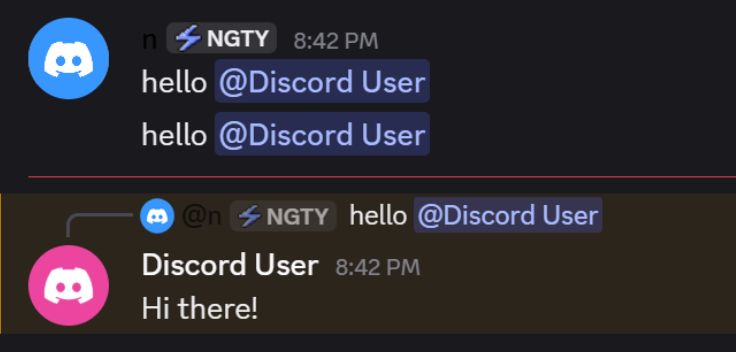
Ask your friend to say "hello" and ping you (for example hello @you on Discord.

If a notification appears saying actions were about to run - it works.

Turn safe mode off and try it for real, again.

When something goes wrong

Check the feature's log first. Nearly every problem writes its reason there: which value was empty, which ID couldn't be found, which action failed.

The three most common causes:

It's…
Look at

Doing nothing

A filter or condition is blocking it - or it's a DM and you used a server-only parameter

Doing too much

Conditions too loose, or a missing Ignore self

Doing the wrong thing

A reference is pointed at the wrong parameter

A rules that will save you

Last updated